|
1)
Open
Eudora
Lite
2)
Select
Tools
and
Options
(on
earlier
versions
of
Eudora
select
Special
and
Configuration)
3)
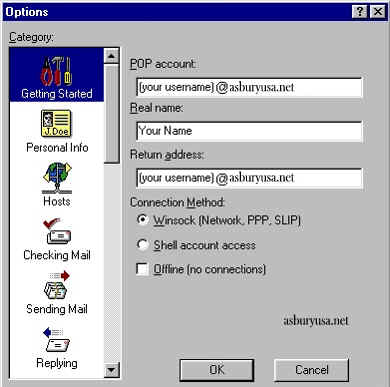
On
Category
select
Getting
Started
4)
Enter
your
account
information
as
shown
below.
Note:
be
sure
to
enter
the
POP
account
information
in
the
format
username@asburyusa.net
5)
On
Category
select
Hosts
6)
Under
SMTP
enter
smtp.asburyusa.net
(leave
other
fields
blank)

7)
Click
OK
You
are
now
ready
to
send
and
receive
email
using
Eudora
Lite
3.0.
Once
connected
to
the
internet
via
your
dial-up
networking
software,
click
on
the
Check
Mail
icon
and
enter
your
password
(the
same
as
your
network
logon
password)
to
check
mail.
For
program
operation
and
features,
consult
the
Eudora
Lite
3.0
"Help"
files
or
contact
Eudora
Technical
Support
at:
http://eudora.qualcomm.com/techsupport/
|



