1)
Open
Eudora
Pro
2)
Select
Tools
and
Options
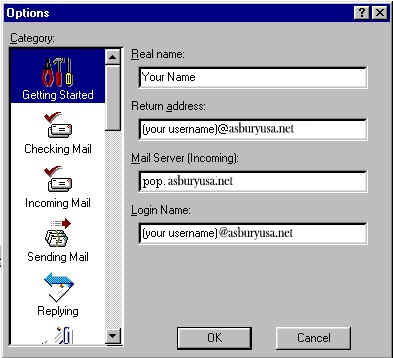
3)
On
Category
select
Getting
Started
4)
Enter
your
account
information
as
shown
below
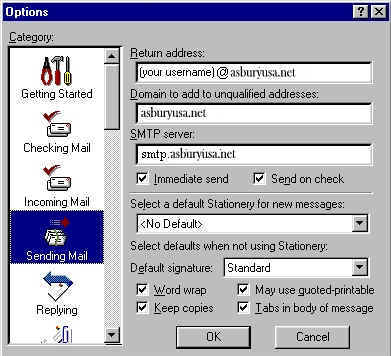
5)
On
Category
select
Sending
Mail
6)
For
SMTP
server
enter
smtp.asburyusa.net
7)
Click
OK
to
save
your
settings
You
are
now
ready
to
send
and
receive
email
using
Eudora
Pro
4.0.
For
program
functions
and
advanced
operations,
consult
the
Eudora
Pro
"Help"
files
or
Eudora
technical
support
at:
http://eudora.qualcomm.com/techsupport/