Home     Dial-Up   |   ISDN   |   Domain Registration   |   Web Hosting


About Us


Access Numbers


Web E-Mail


Customer Support


Contact Us


Internet Explorer 2.0

Configuration   |   FAQ   |   Access Numbers   |   Tech   |   Members Services


1. Launch Internet Explorer

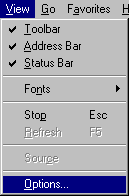
2. From the 'View' menu select 'Options'.
ie2-1.gif (1676 bytes)


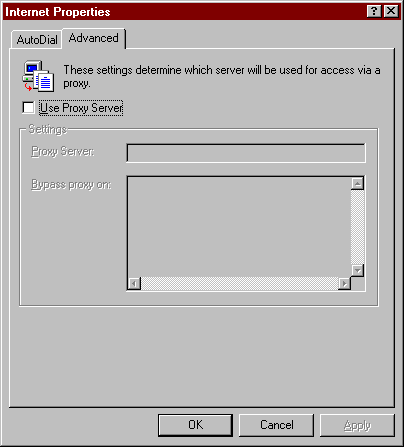
3. When you click on that, a window called ‘Internet Properties’ will pop up. Click on the tab called 'Advanced'.  When you click on that, you will see a screen that looks like this:
ie2-2.gif (5926 bytes)


4. It is at this point when you can put the proxy address and port number the fields.  Once you click in the checkbox called 'Use Proxy Server', you can enter the following proxy server information http://proxy-01.asburyusa.net:8965 A sample screenshot is shown below.

ie2-3.gif (1031 bytes)

5. Once you are done filling in the information, click the 'OK' button to leave the 'Internet Properties' window.


P.O. Box 42106 Bakersfield, California 93384

Toll Free Phone: 877-351-8407

E-Mail: AsburyUSA.net

Dial-Up | ISDN | Domain Registration | Web Hosting | Policies | Access Numbers 

About Us | Customer Support | Contact Information | Click to make AsburyUSA your Default Homepage


Copyright © 2004 AsburyUSA.net. All rights reserved.
