|
1)
Open
Netscape
Messenger.
2)
Select
Edit
3)
Select
Preferences
4)
Select
Mail
&
Groups
from
the
menu.
It
may
be
necessary
to
click
on
the
(+)
sign
in
order
to
reveal
the
sub-groups
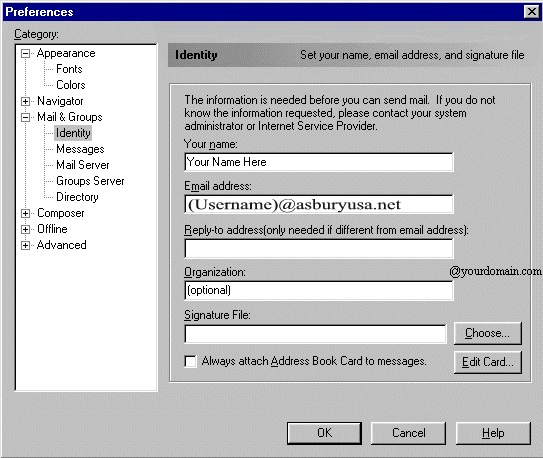
5)
Select
Identity
and
enter
your
account
information
as
below:
6)
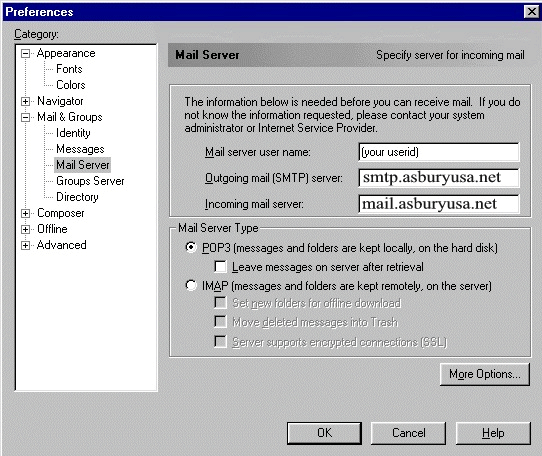
Select
Mail
Server
from
the
menu
7)
Enter
the
user
name
and
mail
server
information
as
shown
8)
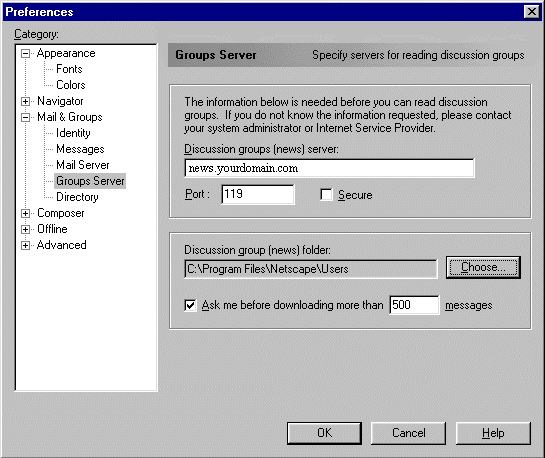
Select
Groups
Server
from
the
menu
9)
Enter
the
news
server
name
as
shown
below
10)
If
desired,
choose
a
news
group
folder
(the
default
is
O.K.)
11)
Click
OK
Your
Netscape
Communicator/Netscape
Messenger
is
now
configured
to
send
and
receive
email
and
use
newsgroups.
For
program
features
and
functions,
consult
the
Netscape
"Help"
files,
or
contact
Netscape
Technical
Support
at:
http://help.netscape.com/ |



