|
1)
Open
Pegasus
2)
From
the
Tools
menu,
select
Options
3)
Under
Categories
select
General
Settings
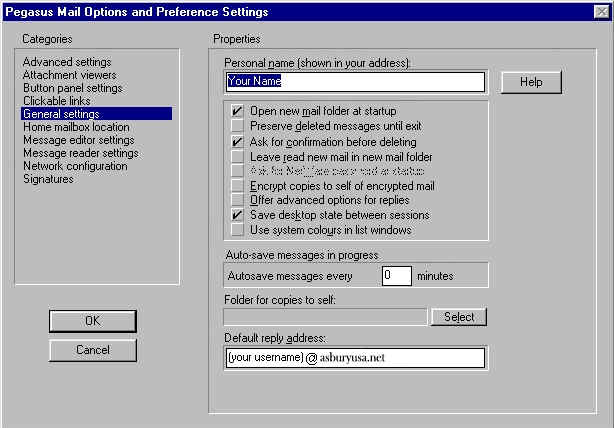
4)
Enter
your
name
and
reply
address
as
shown
5)
Under
Categories
select
Network
configuration
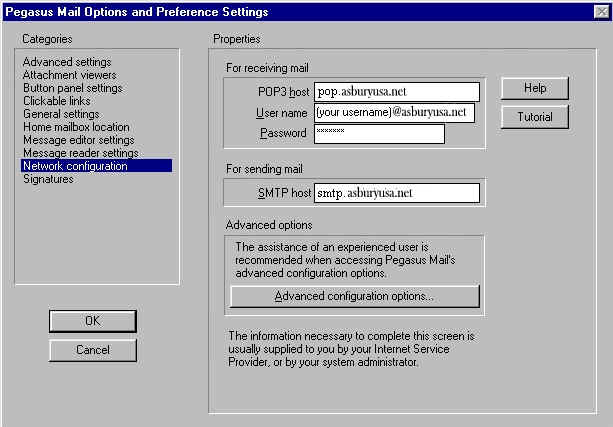
6)
Enter
your
POP3
host,
User
name,
Password,
and
SMTP
host
as
shown
Note:
Your
password
will
echo
as
asterisks.
Passwords
are
case-sensitive
so
type
it
in
carefully.
7)
Click
OK
to
save
your
settings.
If
you
are
new
to
Pegasus,
you
may
want
to
click
on
the
Tutorial
button
to
run
the
Pegasus
tutorial.
You
are
now
ready
to
send
and
receive
email
with
Pegasus
v.
2.55.
For
program
function
and
features,
consult
the
Pegasus
Mail
"Help"
files,
or
contact
Pegasus
online
at:
http://www.pegasus.usa.com/
|



