|
|
Access
Numbers
Web
E-Mail
Customer
Support
Contact
Us
|
|
Windows
NT
|
|
|
|
|
|
- From
the
desktop,
double-click
My
Computer.
- Double-click
Dial-up
Networking.
- If
you
receive
a
message
stating
that
The
phonebook
is
empty...,
then
click
OK
to
add
a
new
entry.
- If
Dial-up
Networking
(DUN)
already
has
other
phone
book
entries,
click
New.
- If
the
New
Phonebook
Entry
Wizard
window
appears,
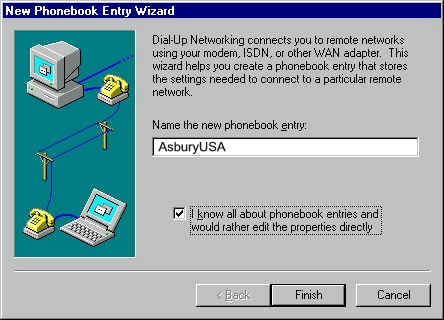
check
the
box
labeled
I
know
all
about
phonebook
entries...
and
click
Finish.
- In
the
New
Phonebook
Entry
dialog,
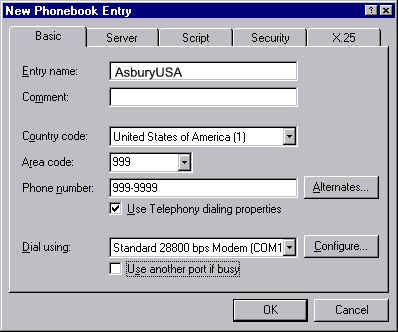
select
the
Basic
tab.
- Check
Use
Telephony
dialing
properties.
- Uncheck
Use
another
port
if
busy.
- For
Entry
name,
enter
AsburyUSA.
- Enter
the
country
code
and
area
code
of
the
number
you
are
dialing,
plus
the
phone
number
itself.
- Under
Dial
using,
select
your
modem.
- Click
the
Configure
button.
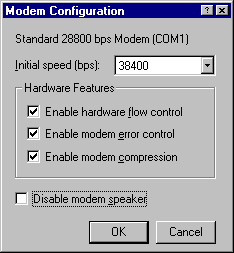
- Set
the
Initial
speed
(BPS)
to
19,200
if
you
have
a
14.4k
modem
or
38,400
if
you
have
a
28.8k
modem.
- Make
sure
all
three
Hardware
Features
boxes
are
checked
(if
applicable)
and
that
Disable
modem
speaker
is
not
checked.
- Click
the
OK
button.
- Select
the
Server
tab.
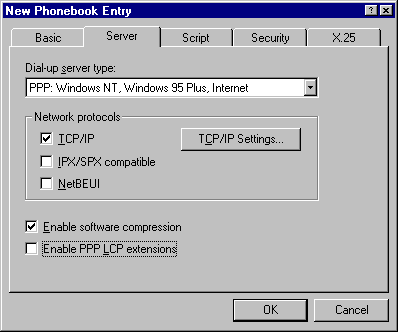
- The
Dial-up
server
type
should
be
PPP:
Windows
NT,
Windows
95
Plus,
Internet.
- For
Network
Protocols
only
TCP/IP
should
be
checked.
- Make
sure
Enable
software
compression
is
checked,
but
Enable
PPP
LCP
extensions
unchecked
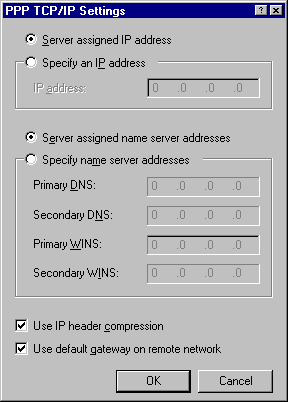
- Click
the
TCP/IP
settings
button.
- Select
Server
assigned
IP
address
and
Server
assigned
name
server
addresses.
- Leave
the
Primary
WINS
and
Secondary
WINS
servers
at
0.0.0.0.
- Check
both
Use
IP
header
compression
and
Use
default
gateway
on
remote
network.
- Click
the
OK
button.
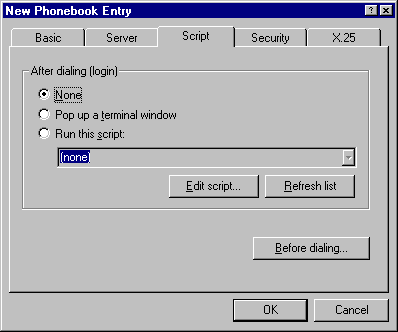
- Select
the
Script
tab.
- Make
sure
None
is
selected.
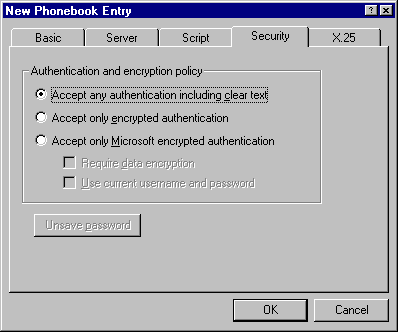
- Select
the
Security
tab.
- Select
Accept
any
authentication
including
clear
text.
- On
the
New
Phonebook
Entry
window,
click
OK.
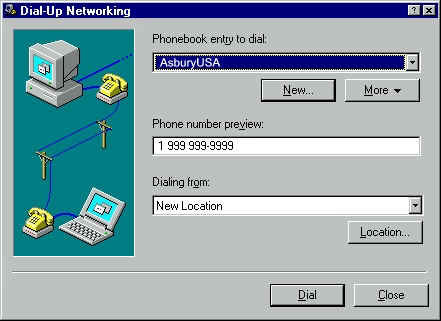
- You
will
now
be
in
the
Dial-up
Networking
program,
and
the
phone
book
entry
you
just
created
should
be
selected
in
the
Phonebook
entry
to
dial
text
box.
- Click
the
Dial
button.
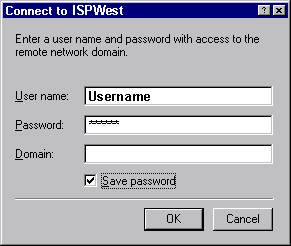
- A
window
will
appear
asking
for
a
username
(make
sure
you
have
"atc"
before
your
your
username
and
one
of
the
following
extensions
behind
it.
"@usa,
@surf.net,
@pop.net,
@world.net"
- Do
not
enter
anything
for
the
Domain.
- There
is
also
an
option
to
Save
Password,
which
can
be
selected
if
desired.
- Click
OK
to
dial
into
AsburyUSA
- Once
you
are
connected,
a
window
will
appear
informing
you
that
you
have
successfully
connected
to
the
Dial-up
Server.
Click
OK
to
close
this
window.
- You
are
now
connected
and
may
use
any
internet
software
such
as
Internet
Explorer
(installed
with
Windows
NT)
Create
a
Shortcut
To
create
a
shortcut
to
the
dial-up
networking
connections
on
your
desktop:
- Double
click
My
Computer
on
your
desktop
- Double
click
Dial-up
Networking
- Right
click
on
your
AsburyUSA
connection
icon
and
click
Create
Shortcut
|
|

|
|
|
|
 |
P.O.
Box 915 Pismo Beach CA 93448
Toll
Free Phone: 877-351-8407
E-Mail:
AsburyUSA.net |

|
|